
Kamis, 14 Januari 2010

Web-based centralized console for tripwire

Introduction

If you use tripwire, you may have to review and accept changes on a daily basis. Logging into multiple servers to accept the changes is troublesome. Enter CentralWire: a open source web-based centralized console to review and accept changes detected by tripwire.

Features

  • It lists all your servers and their statuses (has changes, no changes or no report) on a single web page.
  • You can review the changes.
  • You can accept the changes for one server or for all the servers listed in one step.
  • It integrates with LDAP for authentication.

Installation

Follow the instruction at http://centralwire.sourceforge.net.

Using it

It is easy to use. Once logging in, you start to create servers. For each server, you specify the hostname, the ssh public key and etc.
Once the servers are created, CentralWire will download its latest tripwire report once every 24 hours in the background. If the report contains changes, you can review the report and accept the changes right here in CentralWire.
A step by step tutorial is available at http://centralwire.sourceforge.net/using.html.

sourcecode : ubuntugeek
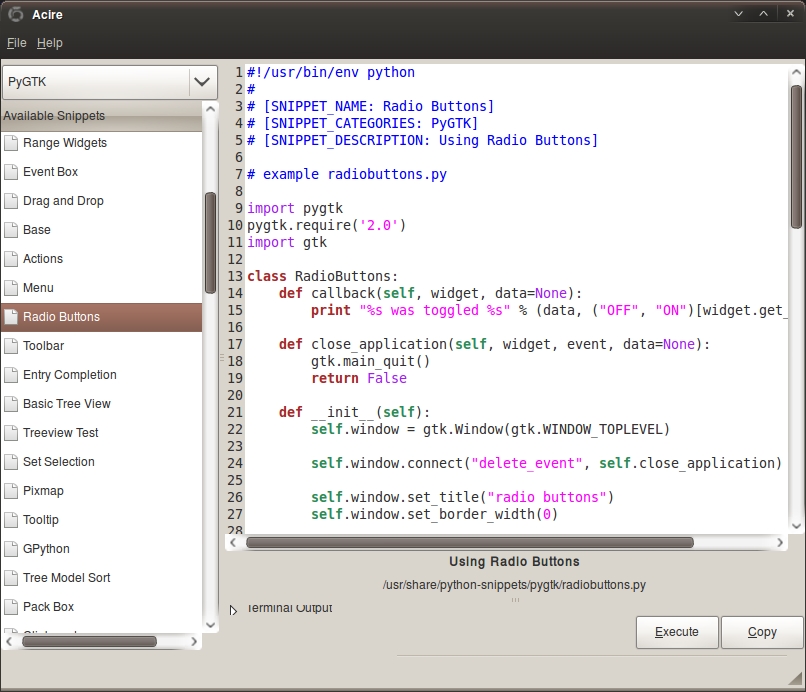
Acire - Browse Python code snippets quickly and easily

 Acire is a simple little tool that provides a library of Python examples called snippets that outline how to do specific taks. With each snippet you can browse the code, run it and otherwise learn how it works in order to help you get to grips with writing your own programs as quickly and easily as possible.
Install acire in ubuntu 9.10 (Karmic)

Run the following commands from terminal first you need to add PPA
sudo add-apt-repository ppa:acire-team/acire-releases
Update the source list
sudo apt-get update
Install acire
sudo apt-get install acire


Subscribe to Python Snippets library updates
For Acire to be in any way useful you will need to grab the Python Snippets library. Subscribe to the PPA and get a fresh batch of Python Snippets daily! Subscribe by just running these commands:
sudo add-apt-repository ppa:python-snippets-drivers/python-snippets-daily
sudo apt-get update
sudo apt-get install python-snippets

Sourcode : ubuntugeek


How to fix the Ubuntu GPG Error BADSIG

If you are seeing Ubuntu GPG Error BADSIG use the one of the following methods to fix
Error Message
W: GPG error: http://archive.canonical.com intrepid Release: The following signatures were invalid: BADSIG 40976EAF437D05B5 Ubuntu Archive Automatic Signing Key 

Try to run the following comamnds from terminal

$ sudo -i
# apt-get clean
# cd /var/lib/apt
# mv lists lists.old
# mkdir -p lists/partial
# apt-get clean
# apt-get update